Cruitical Platform Guide for Interval AI
Want to explore without creating an account first? Visit cruitical.com/demo for a click-through mock demo that shows a snapshot of how the products work and fit together, from both the employer and candidate sides.
Hey Connor, thanks for taking the time to explore the platform. This guide walks you through two demos you can try out today, explains what each part of the product does, and paints a picture of how the full production workflow will look when we're working together on your engineering hire.
There are two things you can play with:
- 1. Company-Side Demo — build your own company profile and role persona, upload resumes, and see how we score and rank candidates against your criteria.
- 2. Candidate-Side Demo — experience what a candidate sees: their Passport (deep research profile) and a Coffee Chat conversation that fills in the gaps.
Both are live at app.cruitical.com. Let's walk through each one.
Getting Started
- Go to app.cruitical.com/sign-in
- Click "Continue with Google" to sign in with your Google account.
That's it, you're in.
Demo 1: Company-Side (Employer View)
Link: app.cruitical.com/company
This is the employer dashboard. It's where you'd manage your company profile, define open roles, upload candidate resumes, and review scored results. Here's the walkthrough:
Step 1: Create Your Company
After signing in, navigate to app.cruitical.com/company. You'll see a "Your Companies" page.
- Click "+ New Company" (or "Set up your first company").
- Fill in:
- Company Name: Interval AI
- Company Website: https://interval-ai.com/
- Lookalike Company (optional): If there's a company whose hiring bar or engineering culture you admire (e.g., Ramp, Linear, Anthropic), you can put them here. We'll calibrate your scoring with inputs from their hiring philosophy. Leave blank if you'd rather not.
- Click Continue.
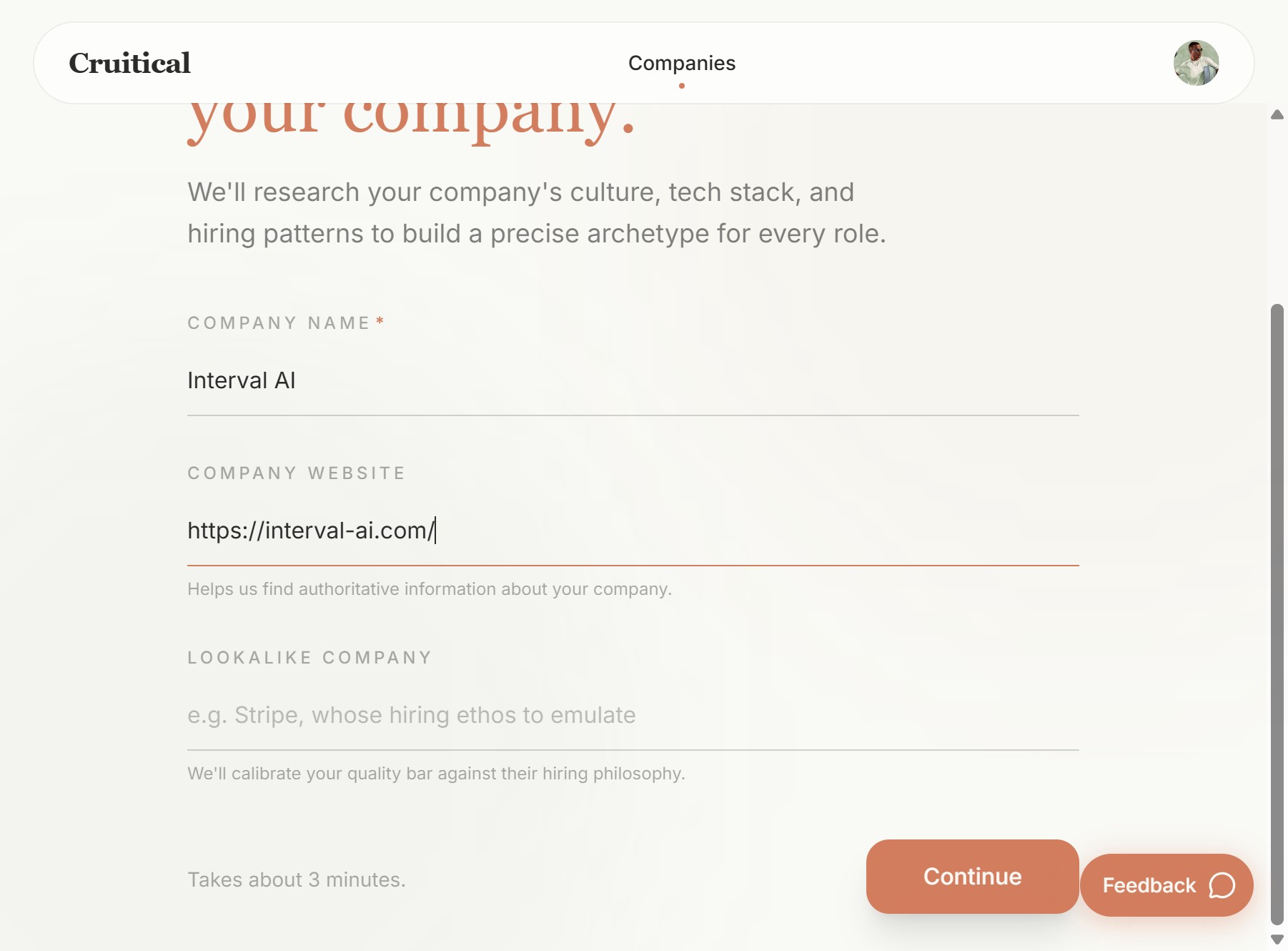
The company setup form. Your website helps us research and build the archetype.
Step 2: Define the Role
Next, you'll define the role you're hiring for.
- Role Title: e.g., "Fullstack Software Engineer"
- Job Description: You can paste a URL to a job listing, or switch to "Text" mode and paste the JD directly. The more detail you give, the sharper the scoring. Optional fields are genuinely optional, the AI will infer from your JD if you leave them empty.
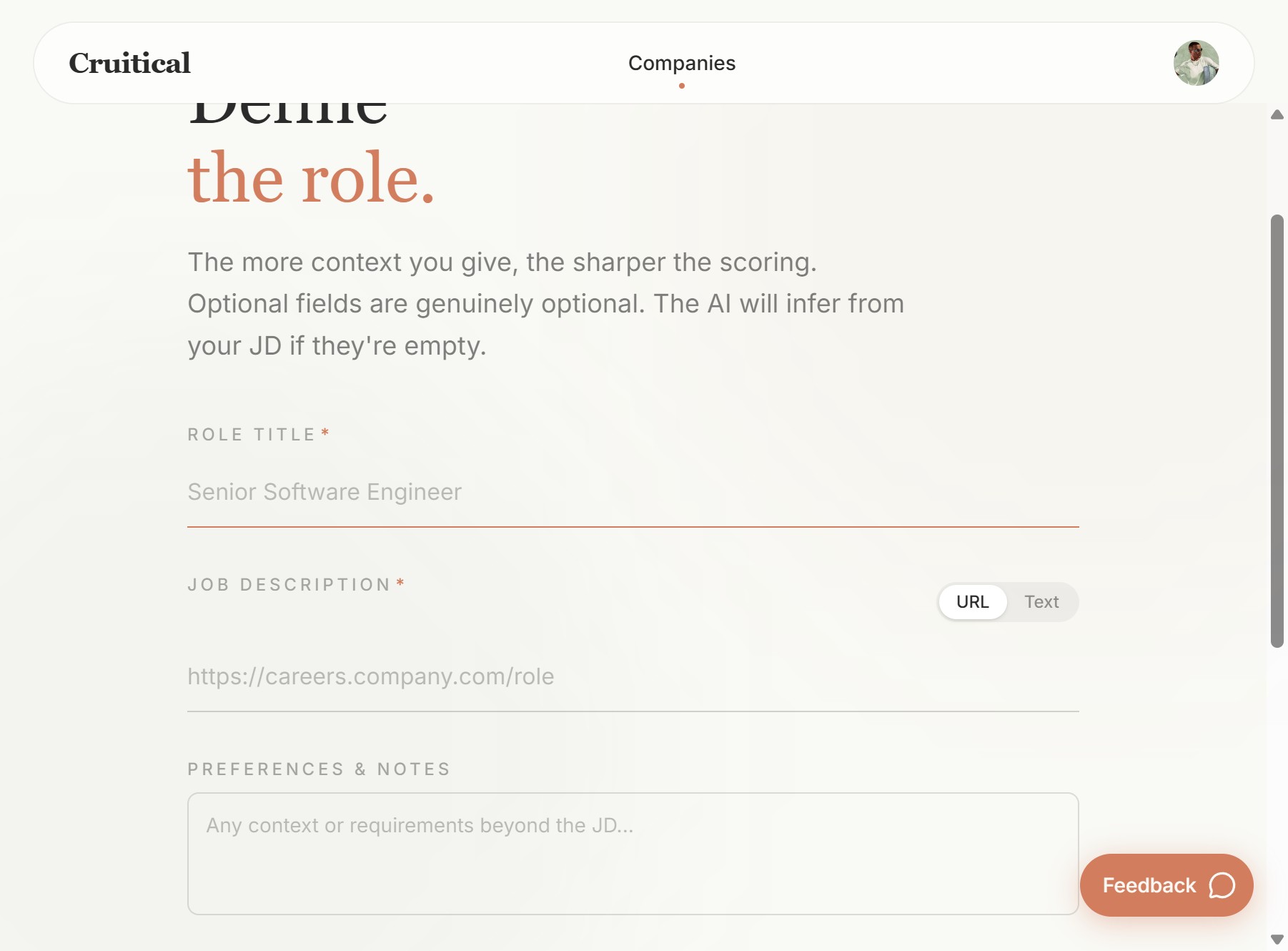
Define your role title, paste a JD (URL or text), and add any extra context.
• Experience with TypeScript, React (Next.js), Postgres
• Comfortable working full-stack
• Aptitude for mentoring junior engineers
Nice-to-have:
• Worked at a startup, started your own company, made a cool side project
• Worked with LLMs and agent workflows before
- Preferences & Notes: Any context beyond the JD. For example: "Familiarity with React.js, TypeScript, Next.js or Postgres, or similar and adjacent frameworks."
- Red Flags: Things you want us to watch for. For example: "Frequent job hopping (consistent 1-year stints)", "No personal projects or shipped work", "Resistance to feedback."
- Signals: Positive traits you care about. For example: "Entrepreneurial spirit", "Lucid communication", "Has mentored people", "Adaptable and high-agency."
Click Continue when ready.
Step 3: Upload Resumes and Evaluate
On the next screen, upload candidate resumes (PDF format, up to 10 at a time). Click "Start evaluation".
You'll see a live progress pipeline:
- Reading resumes — parsing the uploaded PDFs.
- Building passports — for each candidate, we run deep research across their resume, LinkedIn, GitHub, portfolio, publications, and anything else we can find online. This goes well beyond what's on the resume.
- Scoring candidates — each candidate is scored against your Company Archetype and Role Persona.
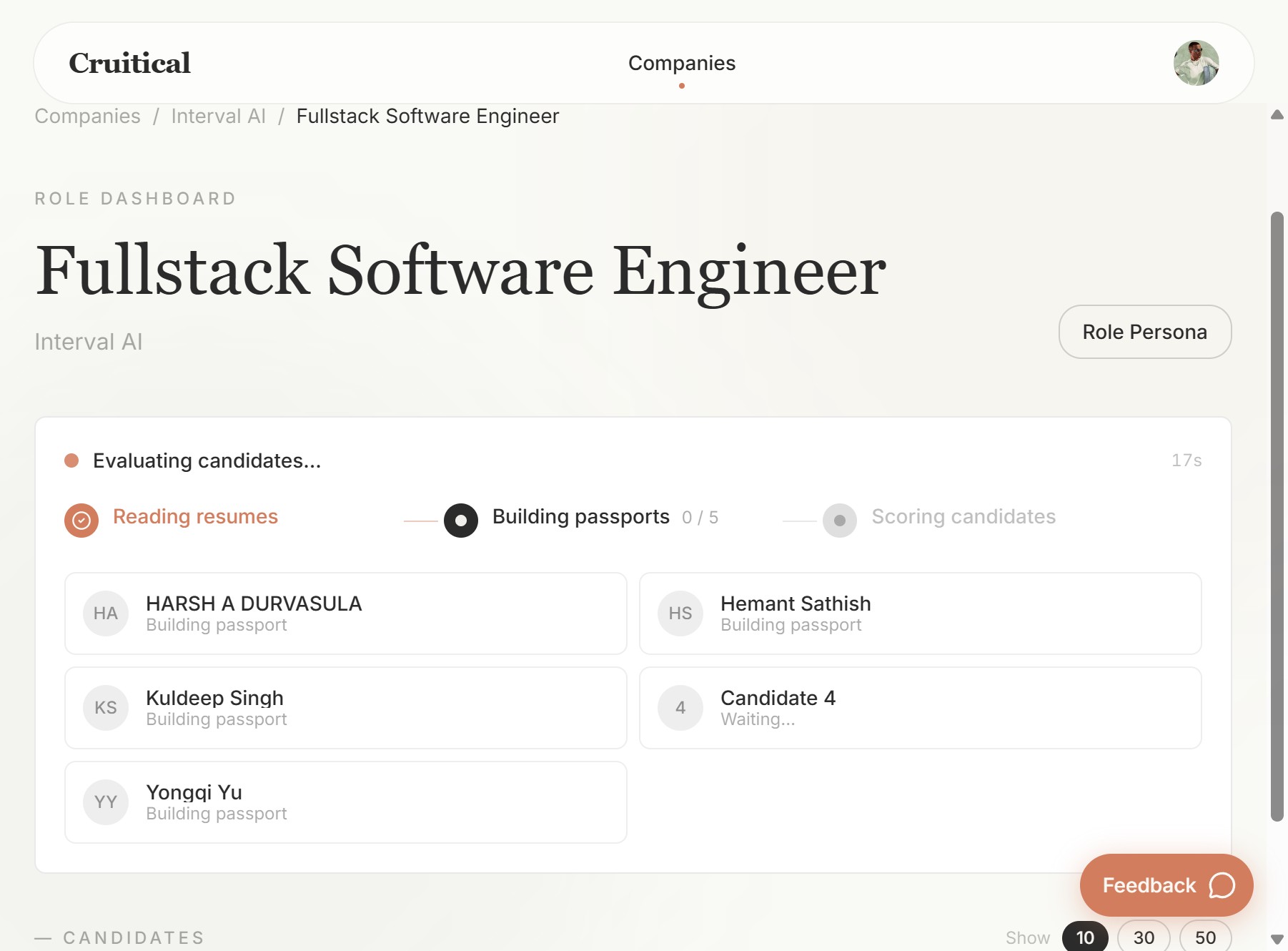
The live evaluation pipeline. Each candidate gets a deep research Passport built and scored in real time.
This takes a couple of minutes. While it runs, you can explore the Archetype and Role Persona (see below).
Step 4: Review the Company Archetype
From the company page (Companies > Interval AI), click "View Archetype".
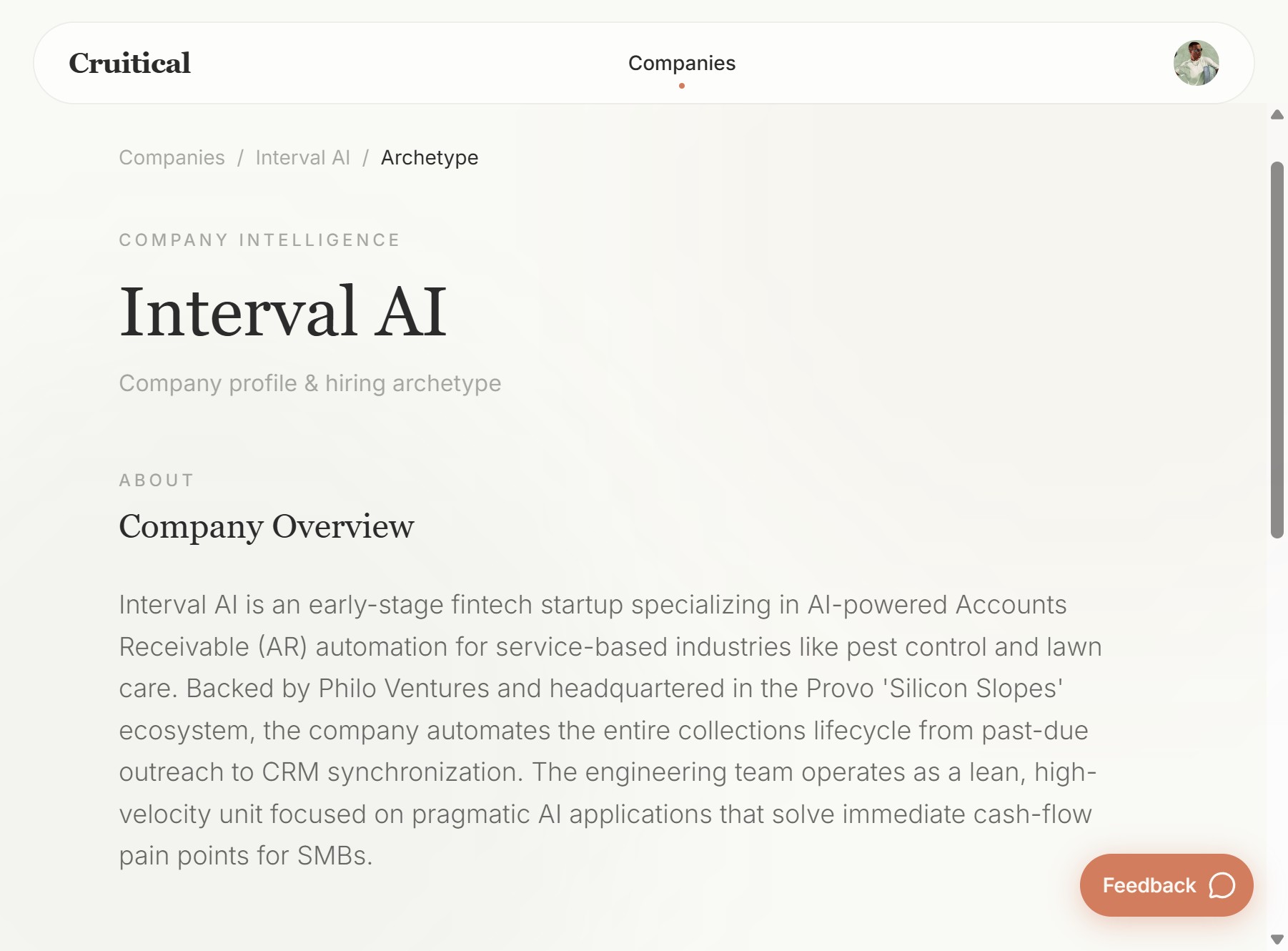
The AI-generated Company Archetype for Interval AI.
This is the AI-generated profile of Interval AI as a hiring entity. It includes:
- Company Overview: What Interval AI does, your stage, tech stack, engineering team structure.
- Hiring Archetype: What kind of people succeed at your company, the engineering culture, and the quality bar.
This was generated from publicly available information. In production, we'd enrich this significantly from our discovery conversations with you: the things you told us about preferring generalists, the importance of working independently, the "set and forget" product philosophy, etc.
Step 5: Review the Role Persona
From the role dashboard (Companies > Interval AI > Fullstack Software Engineer), click "Role Persona".
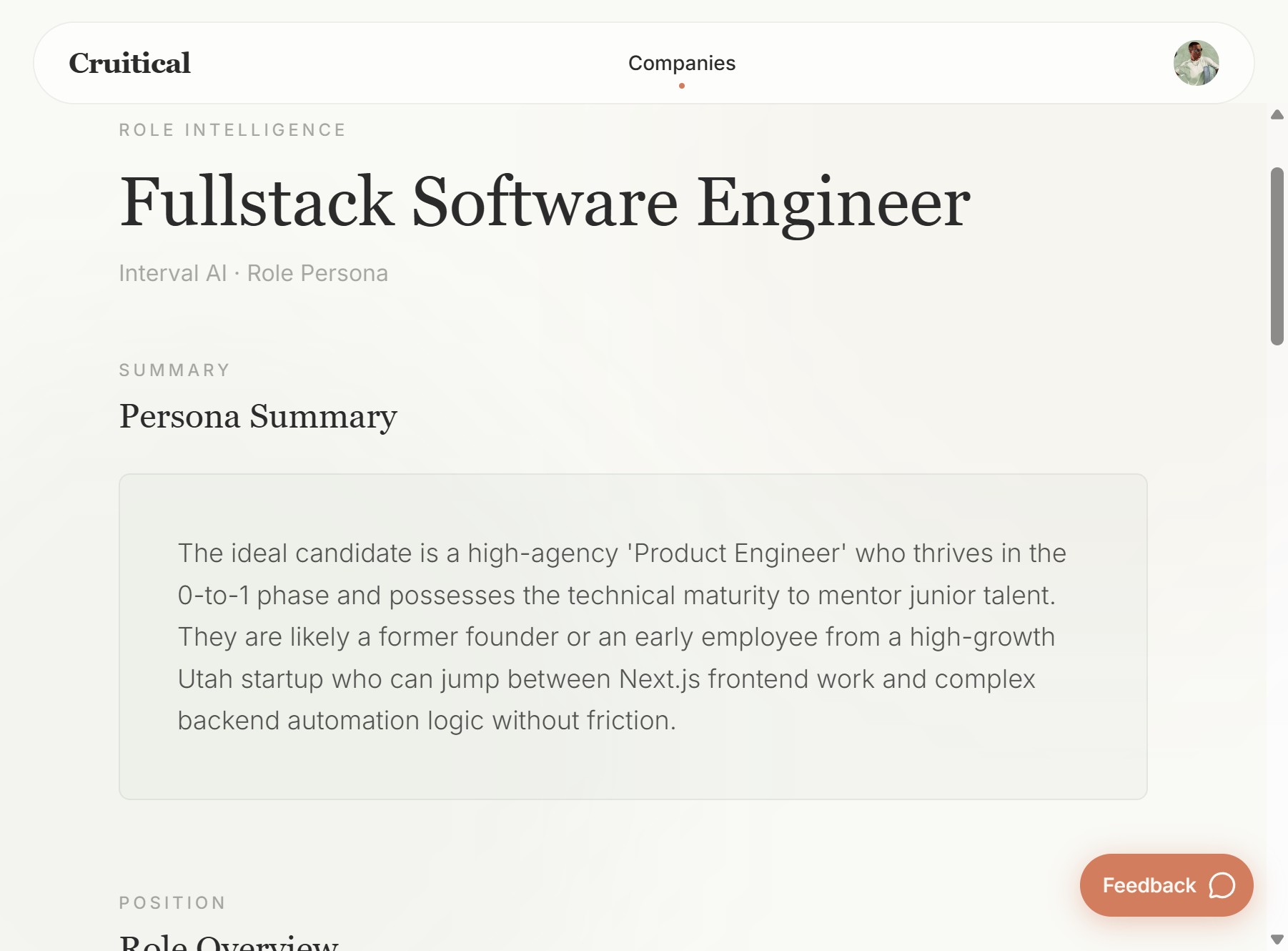
The Role Persona: a structured breakdown of your ideal candidate, not just a job description.
This is the detailed breakdown of your ideal hire:
- Persona Summary: A narrative description (e.g., "The ideal candidate is a high-agency 'Product Engineer' who thrives in the 0-to-1 phase...").
- Role Overview: Responsibilities, expectations, what the work actually looks like day to day.
- Scoring Dimensions: The specific axes we measure candidates on: technical skills, domain experience, growth trajectory, cultural alignment, etc.
Each of these dimensions has a configurable weight. If you care most about raw technical skill and less about growth trajectory, you can adjust the weights accordingly. This directly changes how candidates are ranked.
Step 6: Review Scored Candidates
Once evaluation finishes, go back to the role dashboard. You'll see all candidates ranked by score, each with a short summary of why they scored what they scored.
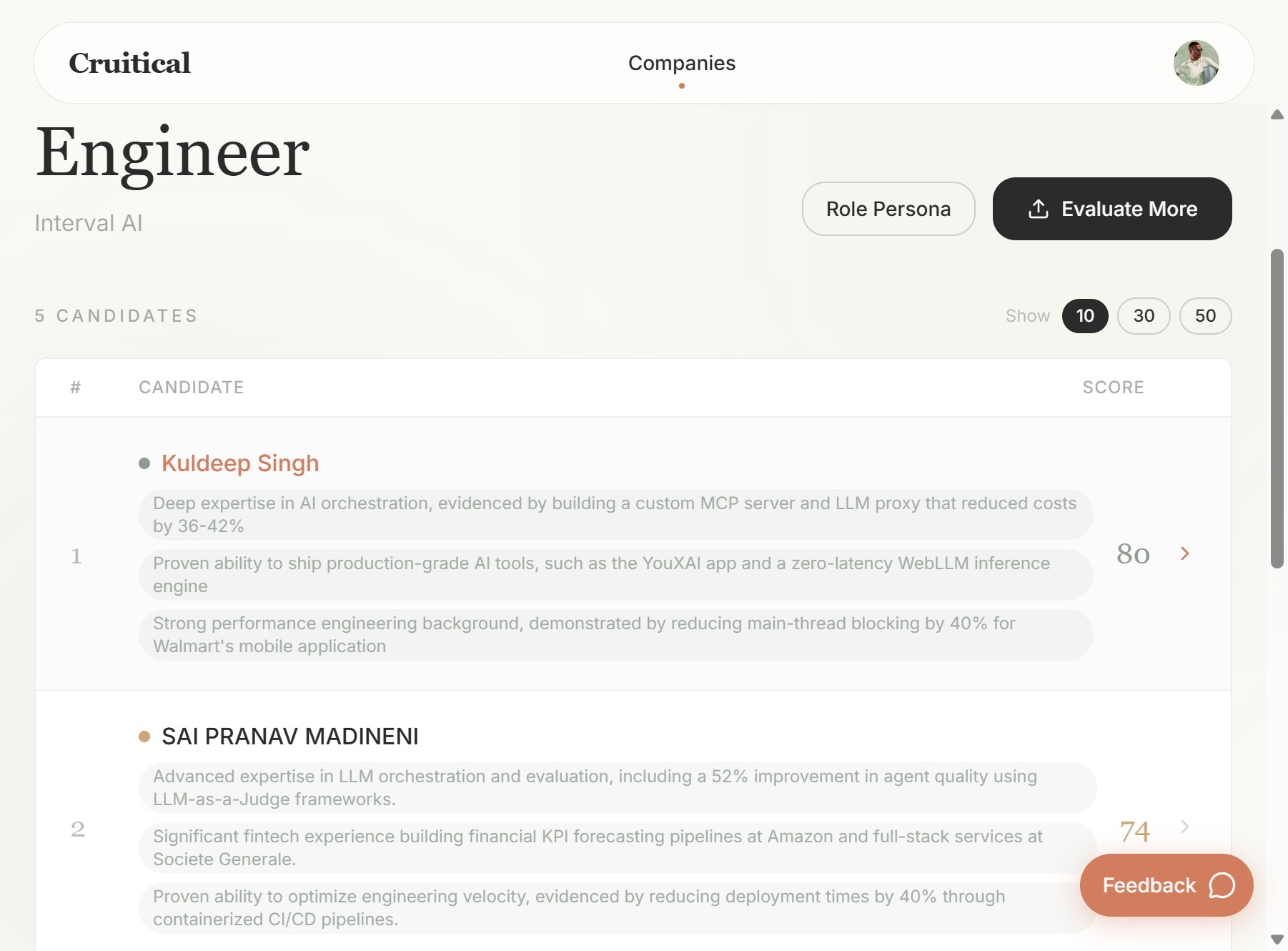
Candidates ranked by fit score, each with evidence-backed highlights at a glance.
Click into any candidate to see their full evaluation:
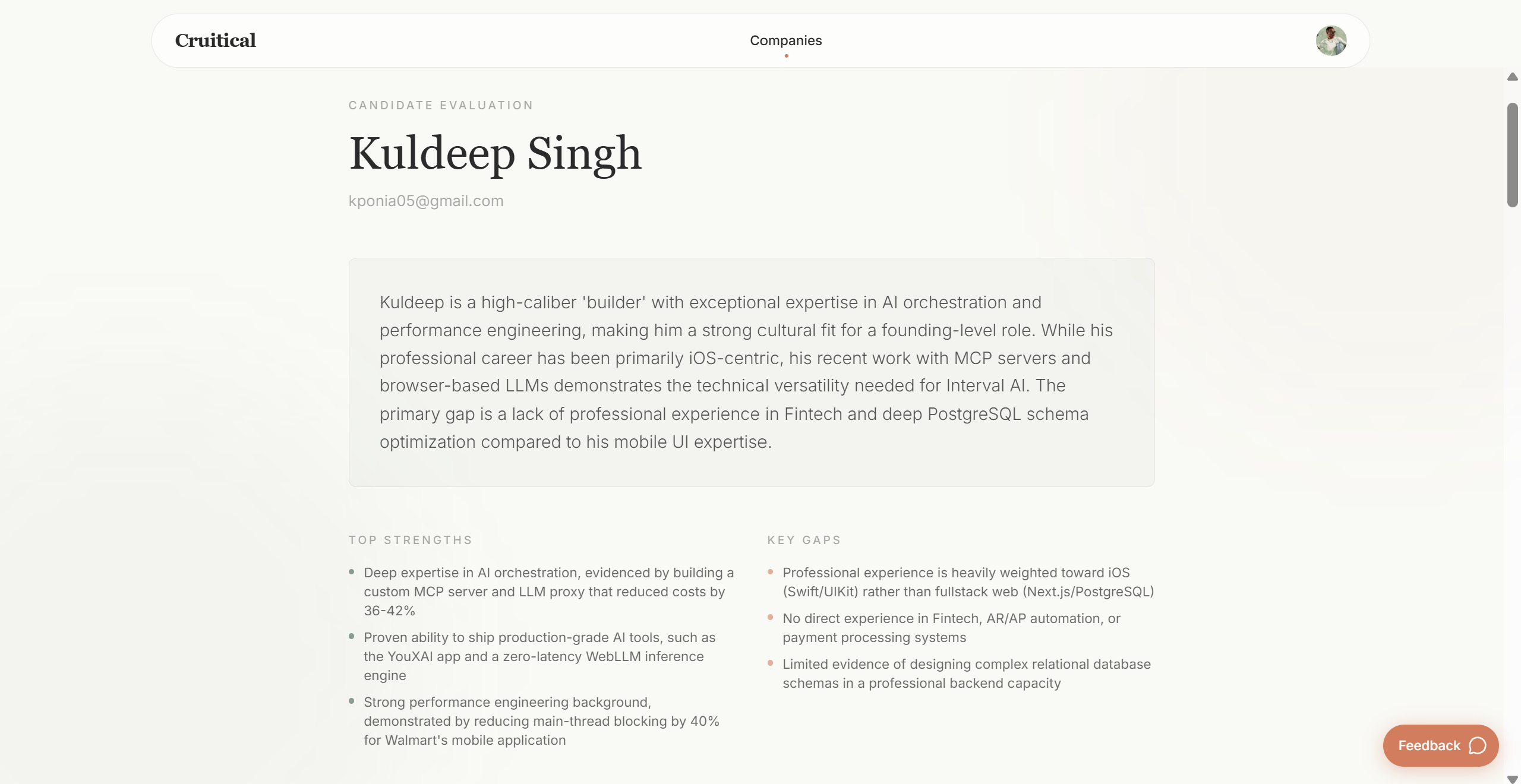
A candidate's full profile: narrative assessment, strengths, gaps, and evidence for every score.
- Candidate Summary: A narrative assessment. For example: "Kuldeep is a high-caliber 'builder' with exceptional expertise in AI orchestration and performance engineering, making him a strong cultural fit for a founding-level role."
- Top Strengths: Evidence-backed highlights. e.g., "Deep expertise in AI orchestration, evidenced by building a custom MCP server and LLM proxy that reduced costs by 36-42%."
- Key Gaps: Honest assessment of where the candidate falls short. e.g., "No direct experience in Fintech, AR/AP automation, or payment processing systems."
- Dimension Scores: Breakdown by each scoring dimension, with evidence for each score.
- Company & Role Alignment: We research each candidate's previous employers, their tech stacks, products, stage, and focus, to assess how transferable their experience is to Interval AI's context.
- Skills Validation: Every claimed skill is cross-referenced against actual work evidence. If someone lists TypeScript on their resume, we look for projects, repos, and work that confirm it.
- Education Context: For candidates from programs or institutions you're not familiar with, we surface cohort quality, outcomes, and relevance, so you have real context and not just a school name.
You can also click "Evaluate More" to upload additional resumes at any time.
Demo 2: Candidate-Side (Candidate View)
Link: app.cruitical.com/candidate
This is what a candidate experiences. When you sign in and land on the default page, you're in the candidate flow. There is an onboarding that walks you through the steps. You can build a passport with your own resume and details to step into a candidate's shoes, or feel free to use one of the resumes we sent you along with this guide.
What You'll See: The Candidate Passport
The first thing you'll see is a Passport, a deep research profile built about you. This is the same engine that powers the company-side demo. It pulls from your resume, LinkedIn, GitHub, portfolio, and public web presence to build a structured, comprehensive profile that goes far beyond what a resume conveys.
What You'll Try: The Coffee Chat
The next step in the candidate flow is the Coffee Chat, an AI-powered voice conversation.
The Coffee Chat can fully replace a behavioral interview, but is modeled to help candidates fill gaps in their profile and enrich their experiences, and allow companies to extract crucial signals like coachability, decision-making, self-awareness and more. It's designed to feel like a real conversation, casual, insight-provoking, and focused on understanding the user as a person. The questions are generated dynamically from your Passport, so they're pointed and specific to your background.
The conversation follows a natural arc:
- 1 Warm-up Getting comfortable, establishing rapport
- 2 Origin Story Career decisions, passions, what drives you
- 3 Pressure Test Challenges, ambiguity, feedback
- 4 Reflection Self-awareness, what you'd do differently
- 5 Unlocks Strengths that don't show on a resume
- 6 Wrap-up Closing thoughts
The whole thing takes about 10-15 minutes, and candidates can talk naturally as they would with a human.
What's being assessed: The Coffee Chat evaluates 40+ behavioral and competency traits, including coachability, critical thinking, self-awareness, communication clarity, working style, and cultural fit signals. These are the kinds of things you told us matter to you: things like whether someone takes feedback well, whether they can figure things out independently, whether they understand the tradeoff between perfection and shipping.
What You'll See After: The Updated Passport
After the Coffee Chat, go back and look at the Passport. You'll see it's been enriched with insights from the conversation, mapped to their appropriate places in the profile.
For the employer view, this means: every trait you care about (like coachability) will have evidence extracted from the conversation, with references back to what the candidate actually said.
The candidate research and Passport engine used here is identical to what powers the company-side demo. The same depth of research, the same scoring engine.
The candidate-side demo exists as a feedback utility that gives candidates a view of how their profile and journey appears to hiring managers and their target companies. It gives them objective, candid feedback on how they stack up against the roles they're targeting, adjacent and fitting roles they haven't considered, and what they can do to improve.
For us, it's primarily a GTM tool: it helps us onboard more candidates into our network, which is what makes the matching work for employers like you at scale.
This flow is not part of the actual operations for an employer. In the production workflow, candidates wouldn't be building their own Passports; we'd build them automatically from the resumes you send us. But the demo lets you see and interact with the products from the candidate's perspective, which we think is valuable for understanding what's under the hood.
How the Production Workflow Would Actually Work
What you're trying today is a self-serve demo. The real workflow, once we're working together, is more streamlined and hands-off for you. Here's what it would look like:
1. We Build Your Company Archetype and Role Persona(s)
Based on our discovery conversations (like the one we had), we create a detailed Company Archetype and Role Persona for each open role. This captures everything: your tech stack (TypeScript, Postgres, Mastra), your "set and forget" product philosophy, the importance of generalists who lean backend, the need for AI/agent or data science depth, the red flags you watch for (job hopping, integrity issues), and the cultural traits that matter (independence, coachability, shipping speed).
You review these profiles and can suggest changes or edits. They're yours to tune.
2. We Connect to Your Candidate Pipeline
We connect with your ATS, LinkedIn, or however you receive applications. We can also programmatically import existing resumes, including the "send your resume to this email" approach you use instead of LinkedIn job postings.
At this stage, you can apply non-negotiable filters (e.g., US-only location, visa status, willingness to relocate to Utah). These get handled automatically before anything else runs.
You can also choose to enroll in matching against our existing candidate network: we have 300+ pre-assessed candidates already in the system, growing everyday.
3. We Build Candidate Passports Automatically
For every applicant, existing and incoming, we automatically build a full Candidate Passport, the deep research profile you saw in the demos. Every resume that comes in gets parsed, researched, and scored against your Company Archetype and Role Persona, without you lifting a finger.
4. Coffee Chats Go Out Automatically (or Selectively)
Candidates meeting a preset score threshold (e.g., 70 out of 100) are automatically sent a Coffee Chat link to "complete and enrich their profile." For candidates who score very high from the start, you can make this optional: some people are clearly strong enough that you may want to skip straight to the next step.
The Coffee Chat enriches their Passport with behavioral and cultural signals that can't come from a resume.
5. JobReady Work Simulations
After the Coffee Chat stage, there are three ways to move forward depending on your preference:
Based on what you told us about wanting to review actual code and see how people structure their work, Option B or C would probably be your style. You mentioned liking standardized assessments (same baseline for everyone, control group effect) and preferring debugging/fixing scenarios over greenfield builds. We can design exactly that: a scaffolded repo with bugs and inefficiencies, where candidates fix and build on top of an existing codebase.
To see a preview of how the company-side analysis for JobReady looks, visit: cruitical.com/demo/jobready
6. You Get a Fully Enriched Candidate Profile
After the assessment, you receive:
- A fully enriched candidate profile with proof of work.
- A complete, timestamped recording of their entire session, chaptered like YouTube, so you can jump to specific moments.
- Analysis of how they think, work, learn, debug, review, and iterate.
- Extraction of the specific signals and traits that matter to you.
- An interactive Q&A layer: you can ask questions like "How did they learn about CRM syncing?" or "How did they review AI-generated code?" and get timestamped answers.
- Access to the sandbox environment itself, so you can go look at the actual code they wrote, how they structured it, and what they shipped.
Code review access is fully supported: you can browse their work directly in the sandbox, and we can also set up the assessment so the final step is "push to this GitHub repo," giving you a familiar code review workflow.
What's Flexible
Our focus is on building the infrastructure that helps you build a hiring process tuned to your preferences. That means most of these moving parts are flexible and customizable:
- Scoring dimensions & weights
You control what matters most. - Score thresholds
For auto Coffee Chat, assessment, and surfacing. - Assessment format
Standardized, dynamic, debugging, greenfield, or a mix. - Coffee Chat focus
Tune what the conversation probes for. - Automation level
Fully automated, fully manual, white-glove, or in between. - Candidate sources
Your inbound, our network, or both. - Non-negotiable filters
Location, visa, relocation, or anything that's a hard pass.
The goal is to help you extract every piece of qualitative signal that helps you make more confident hires, faster and cheaper. The infra is there for you to use however works best for how you like to hire.
Quick Reference
| What | Where |
|---|---|
| Sign in | app.cruitical.com/sign-in |
| Company-side demo | app.cruitical.com/company |
| Candidate-side demo | app.cruitical.com/candidate |
| Click-through mock demo (no account needed) | cruitical.com/demo |
| JobReady analysis preview | cruitical.com/demo/jobready |
| Website | www.cruitical.com |